تفاصيل المنتج
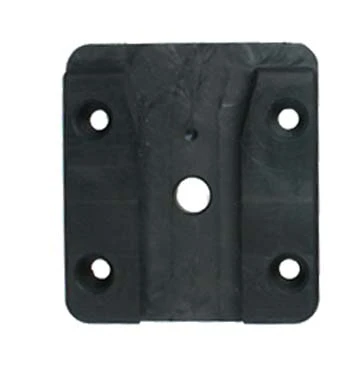
Device Mounting Adapter
101 شاهد الناس هذا العنصر خلال الأسبوع الماضي
الكمية:
The Device Mounting Adapter accommodates all Devices/Device Cradles that have the AMPS hole pattern (a square like hole pattern) in the back of the Device or Cradle.
The Device Mounting Adapter consists of two parts - one Male Plate and One Female Plate that slides into each other and locks into place. The Male Plate attaches to the back of the Device/Device Cradle and accommodates both AMPS landscape and portrait hole pattern/horizontal and vertical hole pattern. The Female Plate attaches to the ProClip Mounting Platform or any other type of mounting bracket or flat surface.
Due to the sliding feature the Device or Device Cradle can easily be removed from the mount. Your Device may have a windshield suction cup mount attached to the AMPS holes. If so, this has to be removed before you can attach the Male Plate. The pictures show the Device Mounting Adapter in use with a Sirius Satellite Receiver and a ProClip Mounting Platform.
دليل تركيب المنتج
رقم الخطوة 1
Place the male plate over the matching holes in the back of your device. (If you have any other mounting device attached this has to be removed first.) Screw the plate to the device using the enclosed screws.

John Doe
Exceptional sound quality and comfort
Lorem ipsum dolor sit amet, consectetur adipiscing elit. Vestibulum at lacus congue, suscipit elit nec, tincidunt orci. Phasellus egestas nisi vitae lectus imperdiet venenatis. Suspendisse vulputate quam diam, et consectetur augue condimentum in.

Jane Smith
Great headphones, battery could be better
Lorem ipsum dolor sit amet, consectetur adipiscing elit. Vestibulum at lacus congue, suscipit elit nec, tincidunt orci. Phasellus egestas nisi vitae lectus imperdiet venenatis.

Michael Johnson
Impressive noise cancellation
Lorem ipsum dolor sit amet, consectetur adipiscing elit. Vestibulum at lacus congue, suscipit elit nec, tincidunt orci. Phasellus egestas nisi vitae lectus imperdiet venenatis. Suspendisse vulputate quam diam.